AI humans13 min read
Persistent memory for AI humans: how Thrifty AI avatars remember the people they talk to
 Thrifty AI Engineering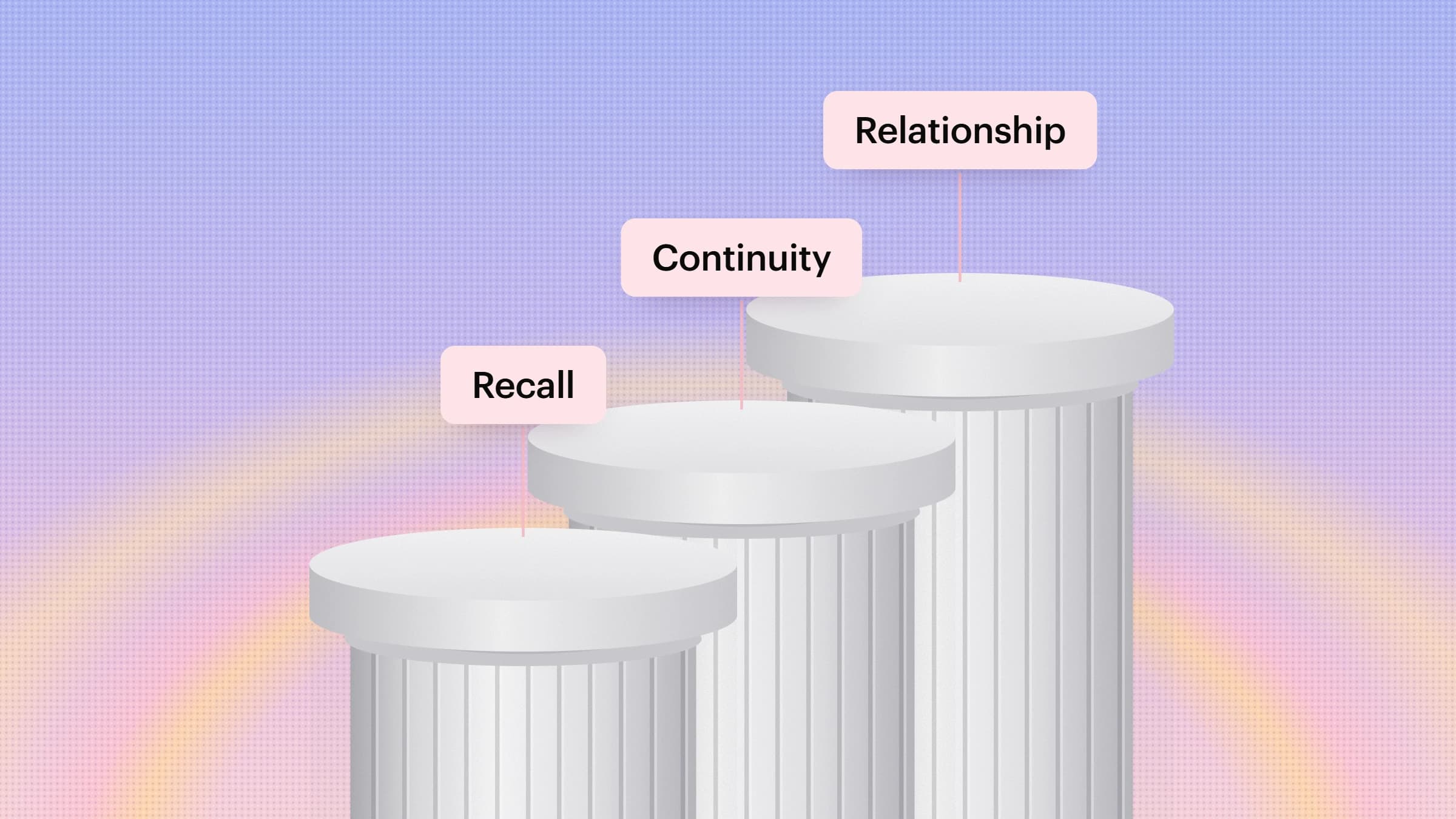
Picture your second conversation with a new colleague. You expect them to remember your name, what you talked about last time and what they promised to do. If they greeted you like a stranger, you would trust them a little less. People hold AI humans to the same standard, and they do it faster than they do with a chat window, because a face signals a relationship. This post explains how persistent memory works in Thrifty AI, why we built it the way we did, and what it changes for the teams who deploy AI humans.
What is persistent memory in an AI human?
Persistent memory is what an AI human knows about a specific person that survives the end of a conversation. It is different from the context the model holds during a single call, which disappears when the call ends, and different from your knowledge base, which is the same for everyone. Memory is personal: it is about one person, it builds up over time, and it shapes how the AI human greets them, what it asks, and what it skips.
Why do AI humans need memory at all?
The language model behind an AI human is stateless. Each request is answered from whatever is in its context window and nothing else, so without a memory layer the tenth conversation is no smarter than the first. That is tolerable for a one-off FAQ. It breaks down quickly in the jobs AI humans are actually hired for:
- Repetition destroys trust. Asking a returning customer for their order number, plan and problem again is the fastest way to make a lifelike face feel like a phone tree.
- Progress needs continuity. A tutor, coach or onboarding guide is only useful if it knows where the learner got stuck last time.
- Personal beats generic. Preferred language, pace, tone and level of detail make the same answer land very differently for different people.
- Faces raise expectations. People forgive a text box for forgetting. A face that looked them in the eye on Tuesday and draws a blank on Thursday feels uncanny.
Memory is what turns a series of good conversations into a relationship. It is also, quietly, an efficiency feature: every question the AI human does not have to re-ask is time back for the person and a shorter session for you.
What does a Thrifty AI human remember, and for how long?
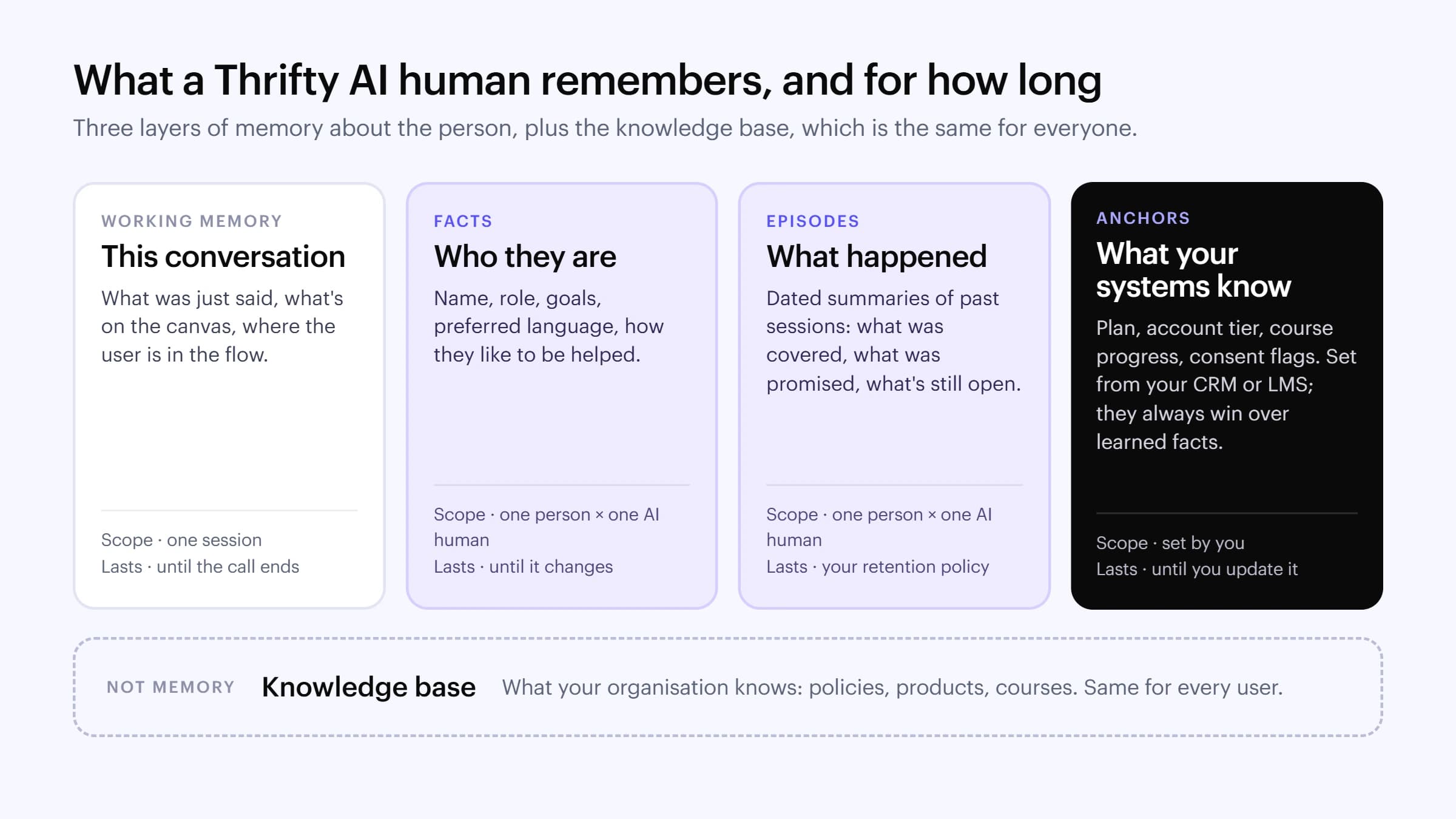
We borrowed the structure from how people remember. Cognitive scientists distinguish short-term working memory from long-term memory, and within long-term memory, facts you know (semantic memory) from events you lived through (episodic memory). Thrifty AI humans use the same split, plus one layer that only a business has: the records in your own systems.
| Layer | What it holds | Where it comes from | How long it lasts |
|---|---|---|---|
| Working memory | The current conversation: what was said, what is on the canvas, where the user is in a flow | The live session | Until the call ends |
| Facts | Name, role, goals, preferred language, how they like to be helped | Learned from conversations | Until they change or are deleted |
| Episodes | Dated summaries of past sessions: topics, decisions, open items, promises made | Learned from conversations | Your retention policy; older episodes are condensed |
| Anchors | Plan, account tier, course progress, consent flags, case status | Your CRM, LMS or app, through the API | Until you update them; they always override learned facts |
Two design choices matter here. First, anchors win. If a customer said in March that they were on the basic plan and your CRM says they upgraded in June, the AI human goes with the CRM. Learned memory is useful but fallible; your system of record is the source of truth. Second, episodes are summaries, not transcripts. Storing what mattered ("agreed to retry the payment on Friday") rather than every word keeps recall fast, keeps prompts small and keeps less personal data lying around.
How is persistent memory implemented in Thrifty AI?
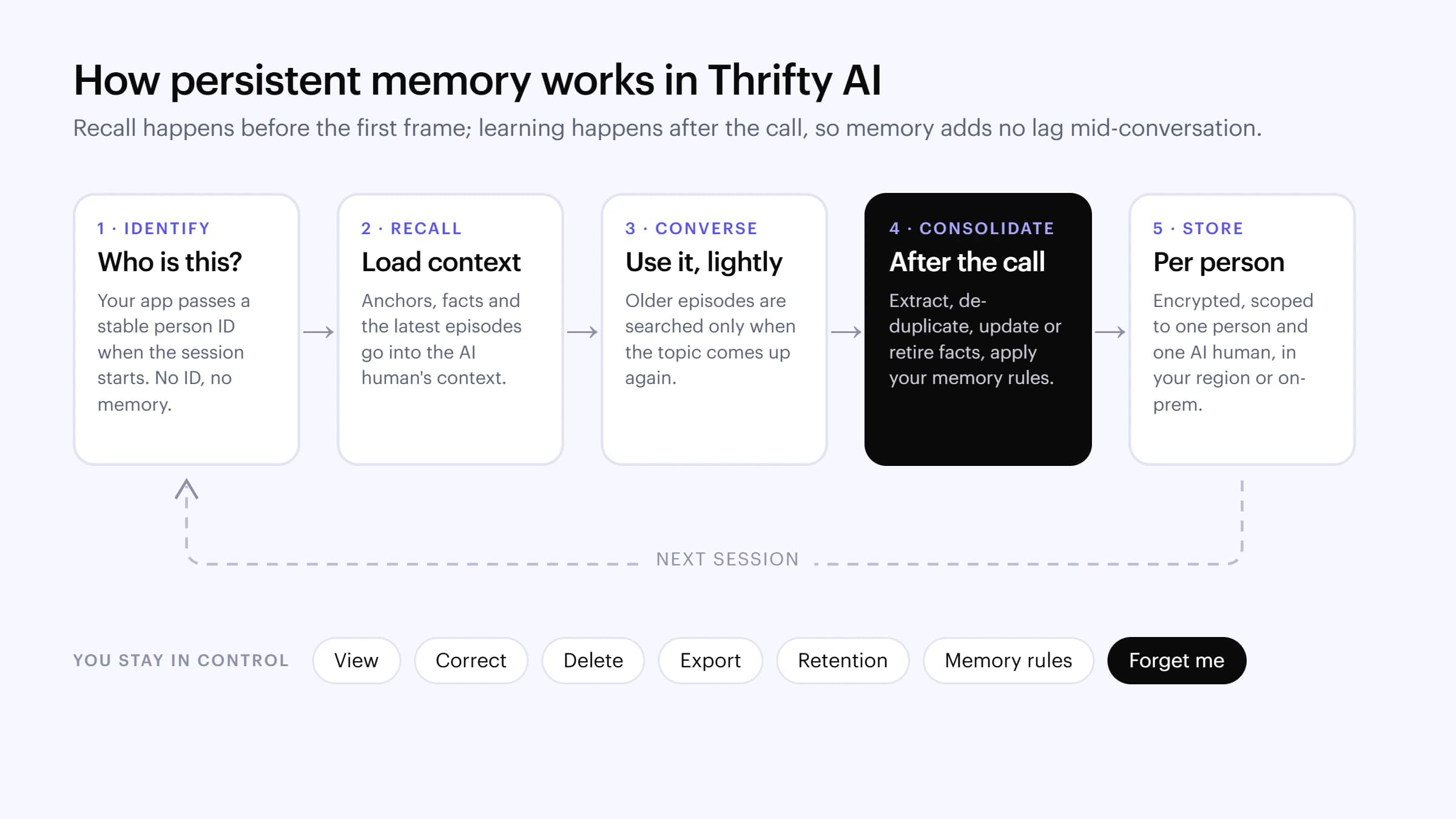
Memory runs as a loop around each conversation. The important property is when each step happens: recall is done before the AI human's first frame, and learning is done after the call ends, so nothing about memory sits on the critical path of a live, lip-synced reply.
1. Identify: who is this?
When your app starts a session, it passes a stable person ID: your internal user or customer ID, never a display name or an email that might change. Same ID, same memory. No ID means a stateless session, which is the right default for anonymous kiosk visitors or one-off website chats. Because the ID is yours, the same person can be recognised on your website, in a Google Meet call and at a kiosk.
2. Recall: load what matters
Before the AI human says hello, Thrifty assembles a compact memory brief: the person's anchors, their current facts and the most recent episodes. It goes into the model's context alongside your persona instructions and guardrails. The brief is deliberately small. Dumping every memory into every prompt makes responses slower and more expensive, and it tempts the model to bring up things that are not relevant.
3. Converse: use memory lightly
During the call, working memory does most of the work. If the conversation turns to something older ("what did we decide about my visa documents back in April?"), the AI human searches the person's earlier episodes and pulls in only what matches. We also tune personas to use memory the way a thoughtful person would: mention it when it helps ("last time you said mornings are easier"), not to show off how much it remembers.
4. Consolidate: learn after the call
When the session ends, a consolidation step reviews the transcript and decides what is worth keeping. It extracts candidate facts and an episode summary, checks them against what is already stored, merges duplicates, updates facts that have changed, and retires facts that are no longer true. Then it applies your memory rules: plain-language instructions such as "never store health details" or "don't keep payment information".
5. Store: per person, per AI human
Memories are stored encrypted and scoped to one person and one AI human. A learner's maths tutor and their careers coach build separate memories by default, which is usually what people expect: you would not want your sales rep reading your support history aloud. When two AI humans genuinely need a shared baseline, such as a learner's goals or a customer's tier, set it once as an anchor for both. For self-hosted deployments, the memory store runs inside your own network alongside the rest of the stack.
Keeping memory healthy over time
A person who talks to the same AI human every week for a year builds up a lot of history. Thrifty condenses older episodes into longer-term summaries, so the brief stays small while the important threads survive. Anchors are the part most likely to go stale, because they only change when you change them, so sync them from your system of record whenever the underlying data changes rather than setting them once.
What does memory look like in a real conversation?
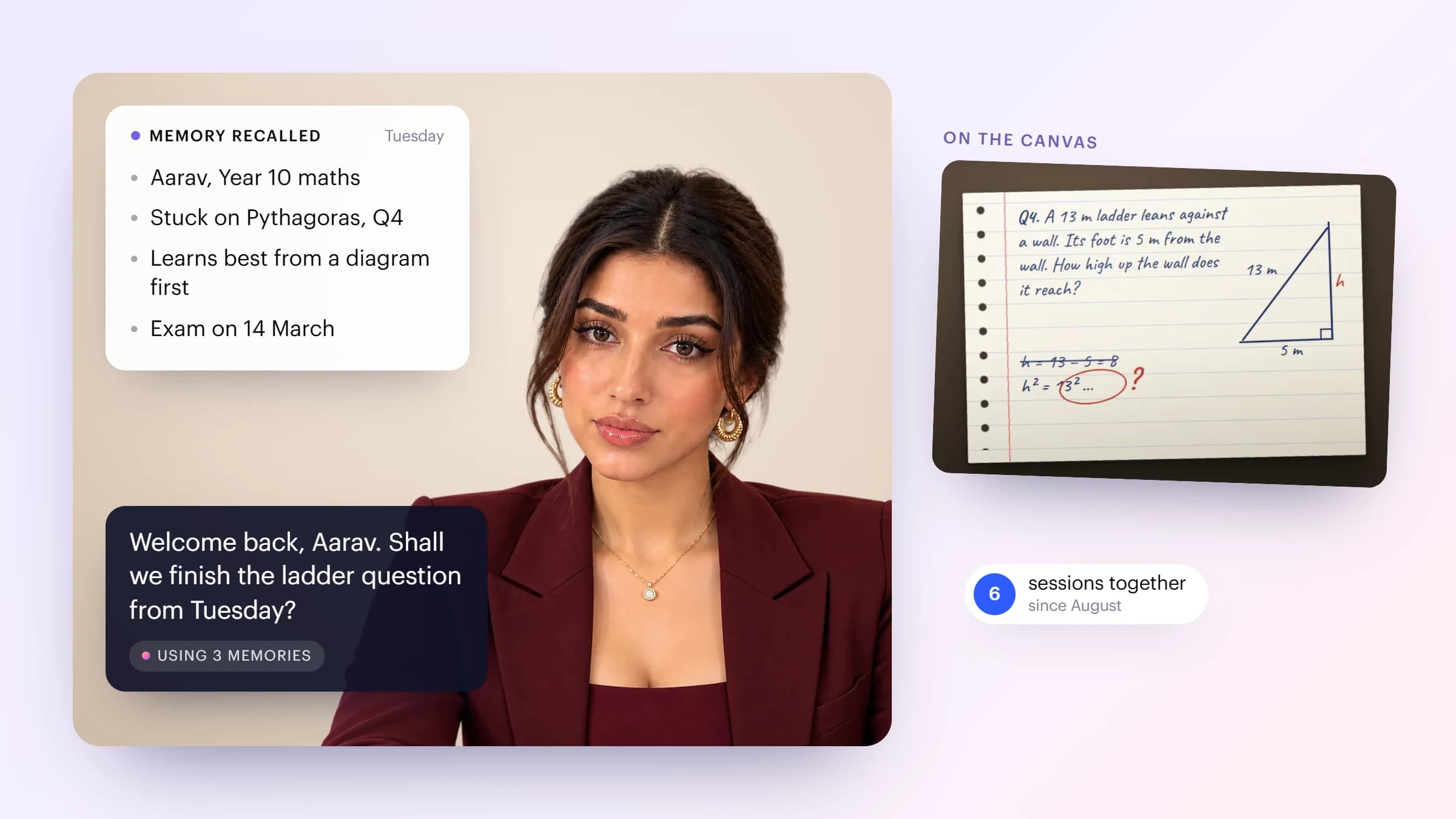
Here is an AI tutor a learner has met six times. Before the session starts, the tutor has recalled that Aarav is in Year 10, got stuck on a Pythagoras question on Tuesday, learns best when he sees a diagram first, and has an exam in March. So it opens with the unfinished question already on the canvas instead of "What would you like to study today?"
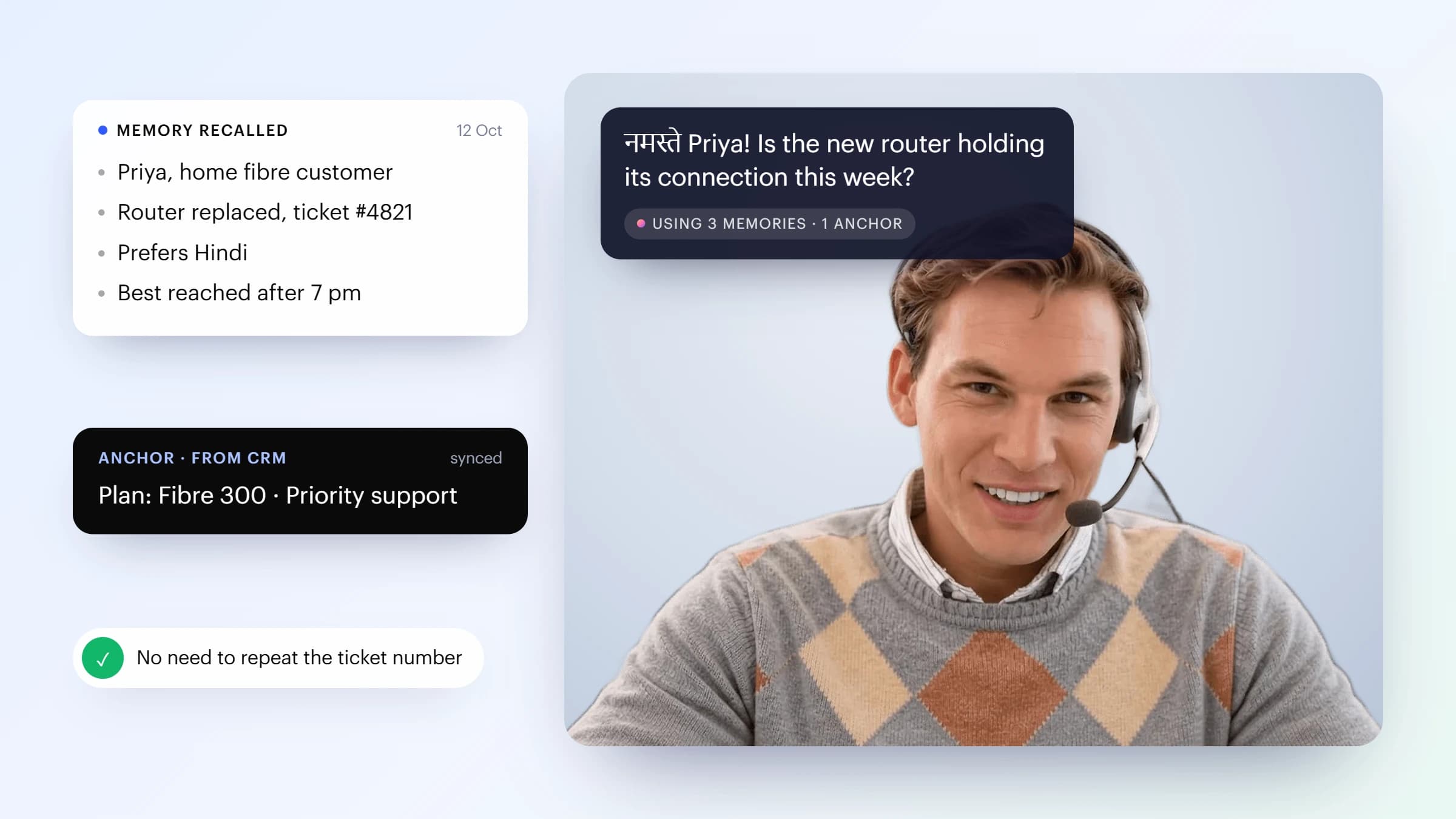
And here is a support agent on a home-broadband line. Memory knows Priya prefers Hindi and had her router replaced on 12 October; the CRM anchor says she is on a priority plan. So the agent opens in Hindi, asks about the new router, and Priya never has to read out a ticket number.
Where does persistent memory pay off?
Memory earns its keep wherever the same person comes back. These are the use cases where our customers see the clearest difference:
| Use case | What the AI human remembers | What changes for the person |
|---|---|---|
| AI tutoring | Topics covered, mistakes made, how the learner learns best, exam dates | Lessons continue instead of restarting; practice targets real gaps |
| Training and coaching | Role-play scores, skills practised, the objections a rep keeps struggling with | Each session builds on the last one, like a human coach |
| Employee onboarding and HR | Start date, team, documents submitted, questions already answered | New hires pick up where they left off across their first weeks |
| Customer support | Past issues, fixes tried, language and channel preferences | No repeated explanations; faster resolution on repeat contacts |
| AI SDR and sales follow-up | Pain points, stakeholders named, objections raised, next steps agreed | Follow-ups feel like the same conversation, not a cold restart |
| Healthcare check-ins | Non-clinical context such as appointment history and preferences, within strict memory rules | Patients feel known without re-telling their story at every visit |
| Hospitality and concierge | Room preferences, dietary notes, past requests | Returning guests get a personal welcome from the first word |
| Banking and financial services | Goals discussed, products explained, documents still outstanding | Advice that builds over time, grounded in anchors from core systems |
What value does memory bring to the business?
- Shorter conversations. The questions an AI human doesn't re-ask come straight off the handling time of every repeat session.
- Higher completion and return rates. Learners finish courses and customers come back when each session feels like progress rather than a restart.
- Better outcomes from the same model. Personal context lets a general-purpose LLM give advice that fits the person, without fine-tuning anything.
- One relationship across channels. Because memory follows your person ID, the same AI human can recognise someone on the web, in a meeting and at a kiosk.
- Richer, structured insight. Episodes are clean summaries of what people asked for and struggled with, which product, training and support teams can learn from, within your privacy rules.
To measure it, compare returning users with memory on and off: repeat-question rate, session length, time to resolution or lesson completion, and satisfaction scores. Memory should make repeat sessions shorter and better, not just friendlier.
How do you keep memory safe and in your control?
Memory about people is personal data, and we treat it that way. Every Thrifty deployment gives you:
- Visibility. See exactly what an AI human remembers about a person: facts, episodes and anchors.
- Correction and deletion. Fix or delete a single fact or episode, or wipe a person's memory entirely with "forget me", for example to honour a data deletion request.
- Retention. Set how long episodes are kept, per AI human, in line with your policies.
- Memory rules and filters. Decide what must never be stored, enforced by instructions and by deterministic filters.
- Consent and disclosure. Every Thrifty AI human discloses that it is an AI; tell users what it remembers and offer a way to opt out.
- Where it lives. Choose your cloud region, or run memory fully on-prem or air-gapped with the rest of the stack.
How do you turn on memory in Thrifty Studios?
- Open your AI human in Thrifty Studios and switch on Memory.
- Write your memory rules in plain language: what to remember, and what never to store.
- Pass a stable person ID when you start each session from your app, embed or meeting link.
- Optionally, sync anchors such as plan, tier or course progress from your CRM or LMS through the API.
- Set a retention period, then test with two or three returning users before you roll out.
Frequently asked questions
What is persistent memory in an AI avatar?
Persistent memory is the information an AI avatar keeps about a specific person between conversations: facts about them, summaries of past sessions, and business context from your systems. It is recalled at the start of each new session so the avatar can pick up where it left off.
How is memory different from a knowledge base?
A knowledge base holds what your organisation knows, such as policies, products and course content, and it is the same for every user. Memory holds what the AI human knows about one person, and it is different for everyone.
Does memory slow down the AI human's responses?
No. In Thrifty AI, memory is recalled before the AI human's first frame and new memories are written after the call ends, so memory adds nothing to the time it takes to answer during the conversation.
Can different AI humans share memory about the same person?
By default each AI human keeps its own memory of each person, so a tutor's notes are not visible to a sales agent. When several AI humans need the same baseline, such as goals or account tier, you set it as an anchor for each of them.
Can users ask an AI human to forget them?
Yes. You can view, correct and delete individual memories, delete everything an AI human remembers about a person, and set retention periods so older memories expire automatically.
What happens if a remembered fact is wrong or out of date?
Anchors from your systems always take priority over learned facts, and the consolidation step updates or retires facts that conversations show have changed. You can also delete a wrong memory and set the correct value as an anchor.
Can persistent memory run on-premises?
Yes. In self-hosted Thrifty deployments the memory store runs inside your own network, including air-gapped environments, alongside speech, the language model, the voice and the face.
Memory is one of the capabilities that make an AI human feel like someone rather than something. Read why AI humans are taking off in 2026, or talk to our team about adding memory to your deployment.